How to Add Meme Sound Effects to Shorts
Place comic cues on actions and reversals while keeping dialogue and reactions audible.
Choose a clip and a licensed cue
Pick a moment with a clear slip, impact or reaction. Use a built-in CC0 sound or a WAV/MP3 you have permission to publish.
Find the actual beat
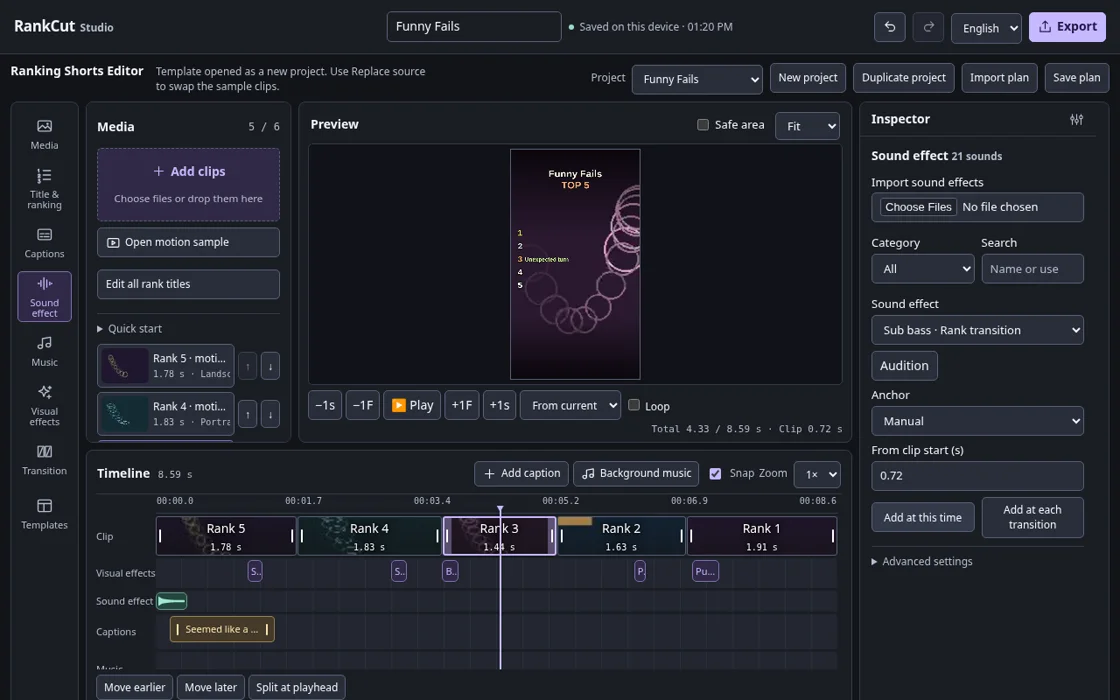
In Funny Fails, select the clip and audition a sound in Sound effects. Watch the lead-in and the reaction so you know which frame needs emphasis.
Choose the right anchor
Use Transition for the entry between clips and Manual for an action within the clip. Enter the clip-relative time or drag the waveform marker along the timeline.
Listen with the source audio
If the cue masks speech, turn down its own volume first. Trim silence at the start of the sound when the audible hit arrives later than the marker.
Review the download
Export in a format your browser offers, then play the saved file to confirm both the original audio and the cue. Check that the playback device is unmuted.