How to Make a TOP 5 Short
Build a five-clip ranking with readable titles and a clear payoff at number one.
Collect five comparable moments
Gather cleared footage with the lead-in, action and reaction still intact. Pick one ranking criterion such as accuracy or difficulty so the order makes sense to a new viewer.
Build from five to one
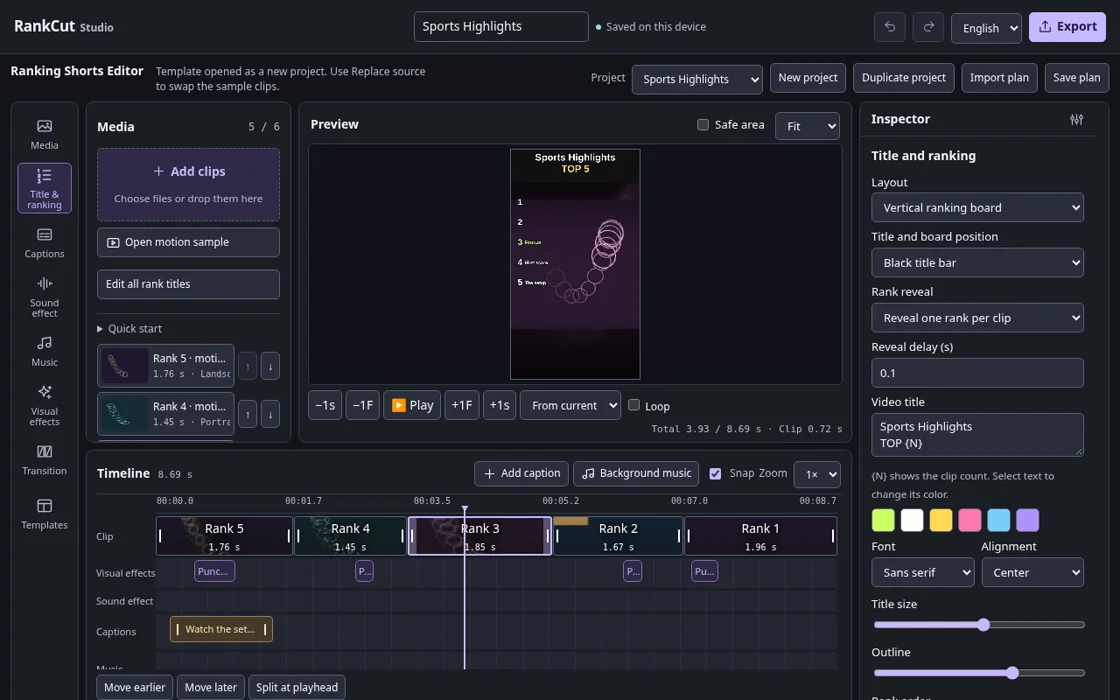
Open Sports Highlights and select each clip to replace its source. If a key action gets cropped, choose Fit with blurred background under the clip’s advanced settings.
Reveal each label in order
Keep the ranking board on Progressive. Give each clip a short name in the inspector. Check the final rank with all five names visible on a phone-sized preview.
Pace for the information
Use 25–40 seconds as a starting range. Let the reaction run when it explains the result, and use shorter lead-ins when the setup is obvious.
Check the downloaded file
Try 1080p on a supported browser. Play the file on a phone to check legibility and cropping. If export is unstable or the codec is unavailable, try a shorter 720p test first.